
Windows Network Debugging Tool: TCP/UDP Debugging, Stress Testing and MQTT
If you debug TCP/UDP on Windows, you have probably used NetAssist (网络调试助手): small and direct, but Windows-only, closed source, with limited help for TCP sticky packets and no built-in stress testing.
NetAssistant is a free, open-source Windows network debugging tool for Windows 10/11. It combines a TCP/UDP client and server, four TCP decoders, MQTT 3.1.1 / 5.0 debugging, hex send/receive, message management, and TCP/UDP-only high-concurrency stress testing in one native desktop app.
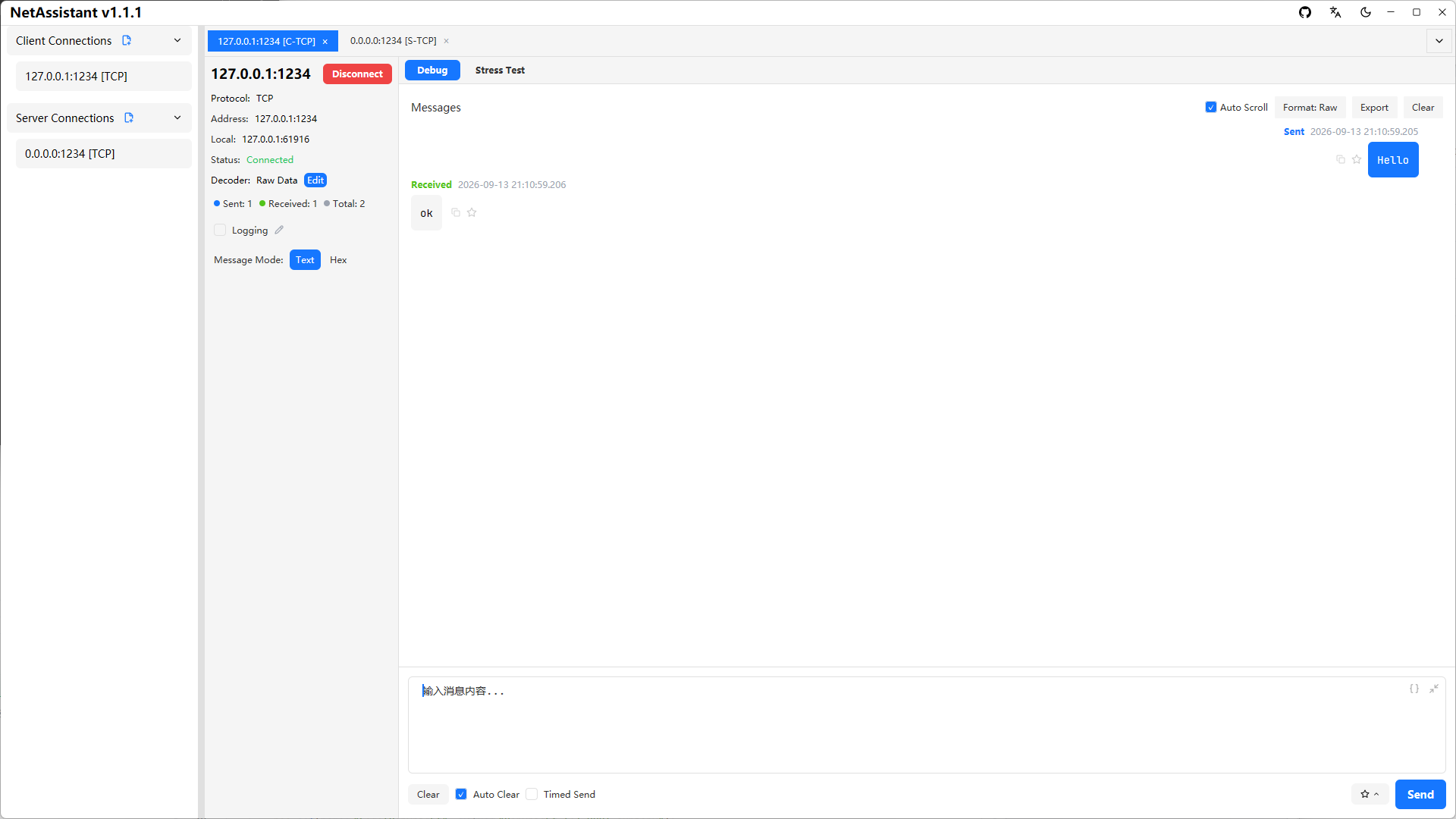
Why Windows users choose NetAssistant
- Free and open source: Apache-2.0 licensed, all features available, source on GitHub
- Sticky-packet decoders: raw, line-delimited, length-prefix and JSON TCP decoders
- Built-in stress testing: QPS plus p50/p95/p99 latency without installing another tool
- Multiple protocols in one app: TCP/UDP client and server, MQTT 3.1.1 / 5.0 client, IPv4/IPv6 dual stack
- Native performance: Rust + Tokio, fast startup, low memory usage and a GPUI-rendered interface
Install on Windows
Option 1: winget (recommended)
winget install SunJary.NetAssistantUpgrade later with:
winget upgrade SunJary.NetAssistantOption 2: installer
Download netassistant-windows-x86_64-setup.exe from the download page and follow the wizard. It creates Start Menu and desktop shortcuts automatically.
Option 3: portable zip
Download netassistant-windows-x86_64.zip, extract it and run netassistant.exe.
ARM64 devices
For Surface Pro X, Snapdragon laptops and other ARM64 devices, download netassistant-windows-aarch64.zip. winget and the installer currently provide x64 builds only; the ARM64 build is an automated artifact that has not been fully tested on physical devices.
Core features
TCP/UDP client and server
Create TCP client, TCP server, UDP client and UDP server connections in one interface, with multi-tab debugging, saved configurations and local address/port binding.
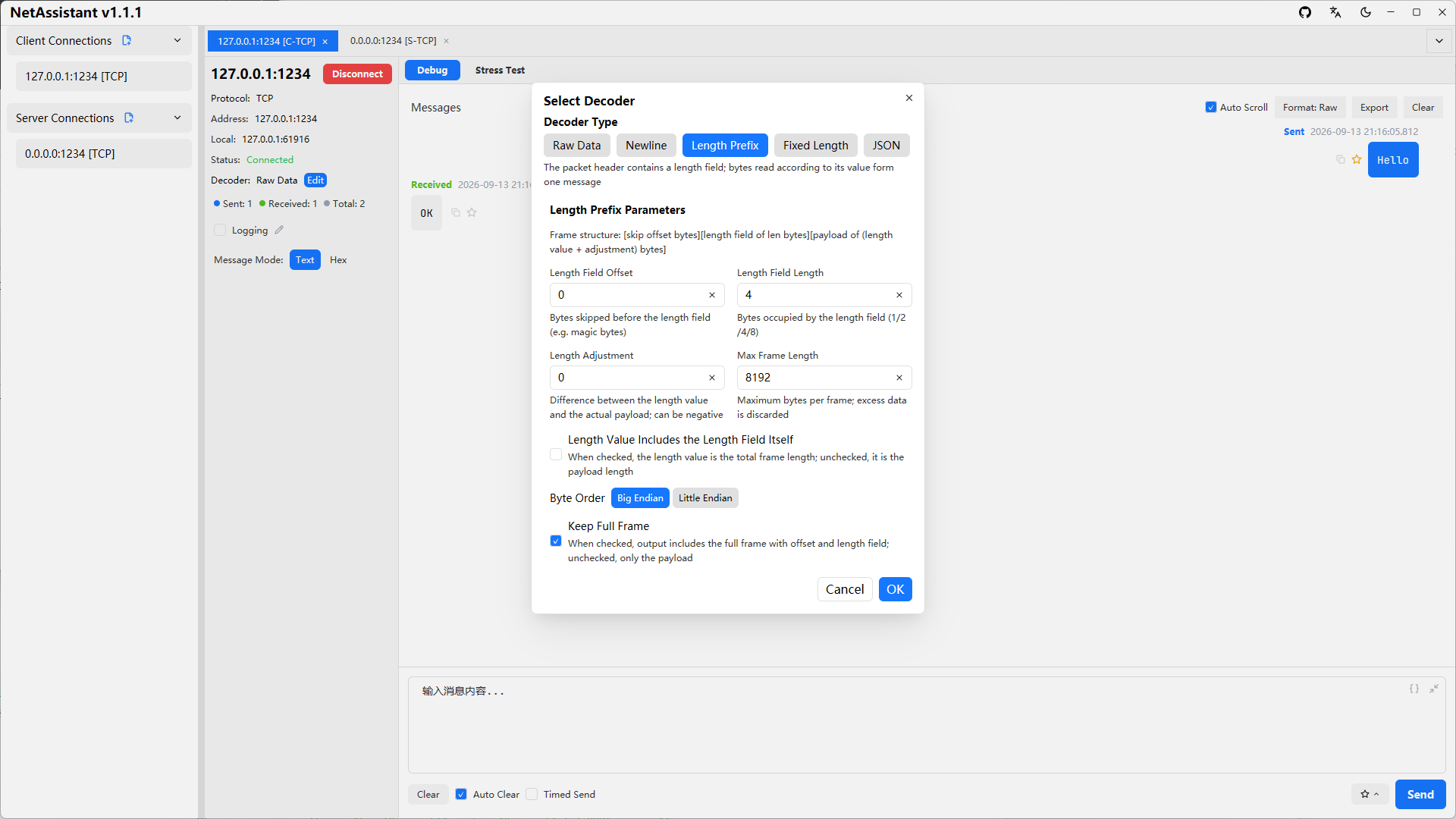
TCP sticky packets and four decoders
TCP is a byte stream, so sticky and split packets are unavoidable. NetAssistant provides raw, line-delimited, length-prefix and JSON decoders so the receiver can split messages by protocol boundary instead of counting bytes manually.
Built-in stress testing
Run high-concurrency TCP/UDP tests in Ping-Pong or throughput mode. See QPS, success rate, active connections, p50/p95/p99 latency and failure breakdown in real time, then export a CSV report. See the stress testing guide.
MQTT 3.1.1 / 5.0 debugging
Create an MQTT connection with broker address, client ID, credentials, keep-alive and last-will settings. Add or remove subscriptions at runtime and publish with topic, QoS and retain.
Built-in toolbox
Convert, checksum, hash, time, JSON, encoding and random tools live in a permanent tab: hex/text conversion, CRC16/CRC32, MD5/SHA, timestamp conversion, Base64/URL encoding and UUID / SM2 / SM4 key generation.
NetAssistant vs NetAssist
| Dimension | NetAssistant | NetAssist |
|---|---|---|
| Platform | Windows / macOS / Linux (x64 + ARM64) | Windows only |
| Open source | Apache-2.0 | Closed source |
| TCP sticky-packet decoders | Raw / line / length-prefix / JSON | Limited |
| Built-in stress testing | QPS + p50/p95/p99 | No |
| IPv6 | Full support | Partial |
| Message export | TXT / JSON / CSV | Limited |
| Auto-reply / periodic send | Yes | Yes |
See the full tool comparison, or read the NetAssist alternative guide.
Typical use cases
- Embedded and hardware debugging: simulate a device or server to verify protocol formats and error handling
- Industrial and IoT: UDP broadcast discovery, hex send/receive and highlighting replies from unexpected addresses
- Backend verification: act as a TCP/UDP client or server to validate communication logic
- Teaching and labs: free, easy to install and suitable for network programming courses
System requirements
| Item | Requirement |
|---|---|
| OS | Windows 10 version 1709 (Build 16299) or later, including Windows 11; Windows Server 2016 and earlier are not supported |
| Architecture | x64 or ARM64 |
| Installation | winget, installer or portable zip |
| License | Apache-2.0, free to use |
FAQ
How do I install NetAssistant on Windows?
Run winget install SunJary.NetAssistant in PowerShell or Terminal, or download the installer/portable zip from the download page.
Does NetAssistant support Windows 7?
No. NetAssistant requires Windows 10 version 1709 (Build 16299) or later, and does not support Windows Server 2016 or earlier.
Is there a Windows ARM64 build?
Yes. Download netassistant-windows-aarch64.zip for ARM64 devices.
How is NetAssistant different from NetAssist?
NetAssist is Windows-only and closed source. NetAssistant is free, open source and cross-platform, with four TCP decoders and built-in stress testing. See the comparison for details.
Is it free?
Yes. NetAssistant is released under the Apache-2.0 license and all features are free.
Does it support IPv6?
Yes. Connections accept IPv4 or IPv6 addresses such as ::1 or fe80::xxxx in both client and server modes.