
Linux Network Debugging Tool: TCP/UDP Debugging and Stress Testing
Linux has plenty of network tools, but most of them are command-line utilities such as nc, socat and tcpdump: flexible, but without a clear view of the packet exchange, manual handling of TCP sticky packets and no built-in stress testing.
NetAssistant is a graphical Linux network debugging tool, free and open source, available as deb, AppImage and tar.gz for x86_64 and ARM64 (including Raspberry Pi). TCP/UDP client and server, four sticky-packet decoders, MQTT 3.1.1 / 5.0 debugging and TCP/UDP-only high-concurrency stress testing live in one app.
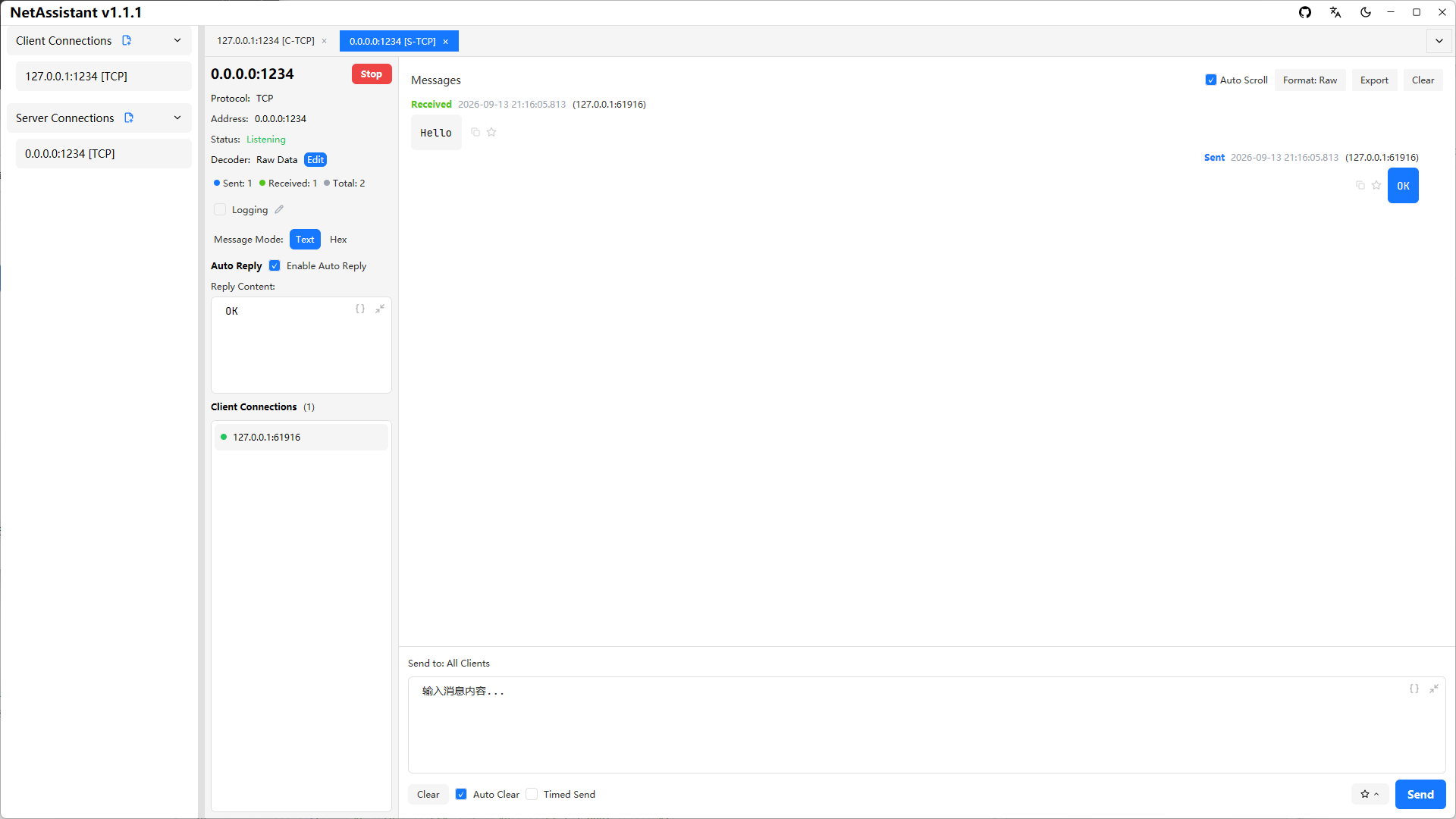
Why Linux users choose NetAssistant
- Graphical send/receive debugging: see packet exchanges like a chat instead of assembling
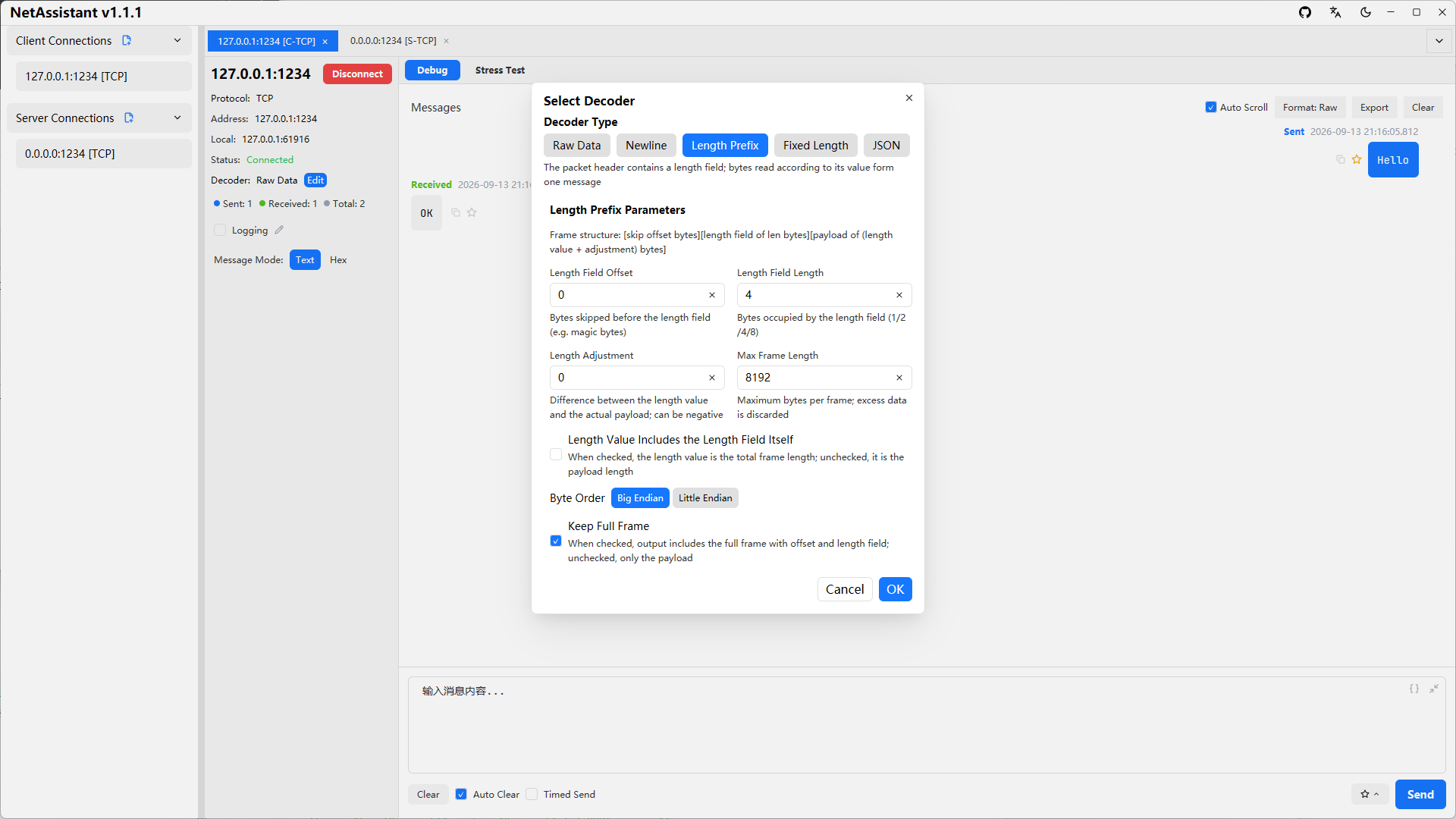
ncarguments - Receive-side decoders: raw, line-delimited, length-prefix and JSON decoders split messages by protocol boundary
- Built-in stress testing: QPS and p50/p95/p99 latency without deploying a separate load generator
- Consistent across platforms: the same workflow on Windows, macOS and Linux, with saved configurations
- ARM64 support: native aarch64 builds for Raspberry Pi 5, ARM servers and similar devices
Install on Linux
Recommended: deb package (Debian / Ubuntu and derivatives)
- Download
netassistant-linux-x86_64.debfrom the download page - Install it and let apt resolve dependencies:
sudo apt install ./netassistant-linux-x86_64.deb- Launch it from the application menu or run
netassistantin a terminal
AppImage (portable, for Fedora / Arch and others)
chmod +x netassistant-linux-x86_64.AppImage
./netassistant-linux-x86_64.AppImage
If it reports a FUSE error on first run:
sudo apt install libfuse2tar.gz (lightweight)
tar -xzf netassistant-linux-x86_64.tar.gz
chmod +x netassistant
./netassistant
The bare binary requires GTK3. If it reports a missing libgtk-3.so.0:
sudo apt install libgtk-3-0ARM64 / Raspberry Pi
Replace x86_64 with aarch64 in the filename, for example netassistant-linux-aarch64.deb, netassistant-linux-aarch64.AppImage or netassistant-linux-aarch64.tar.gz. The ARM64 build is an automated artifact that has not been fully tested on physical devices.
Core features
TCP/UDP client and server
Create TCP client, TCP server, UDP client and UDP server connections with IPv4/IPv6, multi-tab debugging and local address/port binding.
TCP sticky packets and four decoders
TCP sticky packets are one of the most common issues when debugging Linux servers. NetAssistant provides raw, line-delimited, length-prefix and JSON decoders on the receive side.
Built-in stress testing
Evaluate concurrency, latency distribution and stability: Ping-Pong and throughput modes, real-time QPS, p50/p95/p99, failure breakdown and CSV export. See the stress testing guide.
MQTT debugging
An MQTT 3.1.1 / 5.0 client with subscription management, QoS 0/1/2, retain, last-will messages and auto-reply.
Built-in toolbox
Convert, checksum, hash, time, JSON, encoding and random tools in a permanent tab, including hex/text conversion, CRC16/CRC32, MD5/SHA, timestamp conversion, Base64/URL encoding and UUID / SM2 / SM4 key generation.
NetAssistant vs command-line tools
| Dimension | NetAssistant | nc / socat | Wireshark / tshark |
|---|---|---|---|
| Form | Graphical app | Command line | Packet capture and analysis |
| Packet exchange view | Chat-style log with search, favorites and export | Manual output handling | Per-packet view |
| TCP sticky-packet decoders | Raw / line / length-prefix / JSON | Custom parsing required | Partial stream reassembly |
| Built-in stress testing | QPS + p50/p95/p99 | No | No |
| Scripting | No | Strong | Strong (tshark) |
| Best for | GUI debugging and protocol validation | Scripts, pipes and servers | Capture-based troubleshooting |
nc and socat are better for scripting and headless environments; Wireshark is better for packet capture. NetAssistant fills the gap for graphical send/receive, sticky-packet decoding and live load metrics.
Typical use cases
- Embedded Linux / Raspberry Pi: debug TCP/UDP directly on the device and verify sensor or control commands
- Server debugging: act as a client or server to validate protocol formats and error handling
- IoT device discovery: send a UDP broadcast discovery command and highlight replies from unexpected addresses
- Teaching and labs: run network programming labs on a Linux desktop without a Windows VM
System requirements
| Item | Requirement |
|---|---|
| OS | Ubuntu 22.04 or later, or another mainstream distribution |
| Architecture | x86_64 or ARM64 (aarch64) |
| Graphics | GTK3 required; a Vulkan-compatible GPU is recommended |
| Installation | deb, AppImage or tar.gz |
| License | Apache-2.0, free to use |
FAQ
How do I install NetAssistant on Linux?
On Debian or Ubuntu, download the deb package and run sudo apt install ./netassistant-linux-x86_64.deb. Other distributions can use the AppImage or tar.gz package. See the download page.
How do I fix the AppImage FUSE error?
Install libfuse2 with sudo apt install libfuse2, then run the AppImage again.
What if libgtk-3.so.0 is missing?
Install GTK3 with sudo apt install libgtk-3-0. The bare binary and tar.gz packages require it.
Does the Linux build support ARM64 and Raspberry Pi?
Yes. aarch64 deb, AppImage and tar.gz packages are available.
Does NetAssistant have a CLI?
No, it is a graphical application. For scripted tests, use nc, socat or iperf; NetAssistant is for GUI debugging, sticky-packet decoding and live metrics.